
Download NFON Contact Center Hub – call center, agent tools, productivity, contact center, desktop app, NFON, workflow management, queue management, manual dialing, call management, pause control, call pick-up indication, workflow efficiency, agent performance, communication tools, desktop software, telephony integration, customer service, real-time monitoring, team coordination
Overview
The NFON Contact Center Hub is a desktop application tailored for call center agents aiming to improve operational efficiency and streamline daily workflows. Designed as a complementary tool within the NFON ecosystem, it supports seamless integration with existing telephony systems to enhance agent performance and team coordination. The app enables users to manage calls, monitor queues, and control their availability with precision, all from a centralized interface.
Its primary purpose is to empower agents with intuitive tools that reduce manual effort, minimize missed calls, and support real-time responsiveness. By providing features such as manual dialing, call pick-up indication, and pause control, the application addresses common pain points in high-volume contact center environments. It is particularly suited for businesses leveraging NFON’s communication infrastructure who seek to optimize agent productivity without additional licensing costs.
Target users include customer service representatives, support agents, and operations managers in mid-to-large enterprises. The application plays a key role in the broader productivity and telephony integration landscape by bridging human interaction with system automation. Although the developer did not provide additional technical details, the app’s availability at no extra cost with an NFON license underscores its strategic importance in enhancing customer service delivery and workflow efficiency.
Key Features & Functionality
- Manual Dialing: Agents can initiate calls directly from the application, offering full control over outreach to clients or leads without relying on automated dialers. This is ideal for personalized follow-ups or when precise timing is required.
- Call Management: The app allows agents to answer or reject incoming calls with minimal effort. This functionality supports dynamic workload handling, enabling agents to prioritize urgent calls and maintain a consistent service pace.
- Pause Control: Agents can seamlessly start and end breaks within the application. This feature ensures accurate status tracking and prevents workflow disruptions during non-working periods.
- Call Pick-Up Indication: A visual or auditory alert notifies agents when a call is routed to them, reducing the risk of missed interactions and improving team responsiveness.
- Queue Management: Agents can log in and out of multiple queues and devices effortlessly. This flexibility supports dynamic team assignments and ensures agents are available when needed across different service channels.
These features collectively support a structured workflow, helping agents maintain focus, reduce errors, and improve service quality. For example, during peak hours, an agent can quickly switch between queues while using pause control to manage short breaks, ensuring continuous availability without overextending.
Interface, UX & Performance
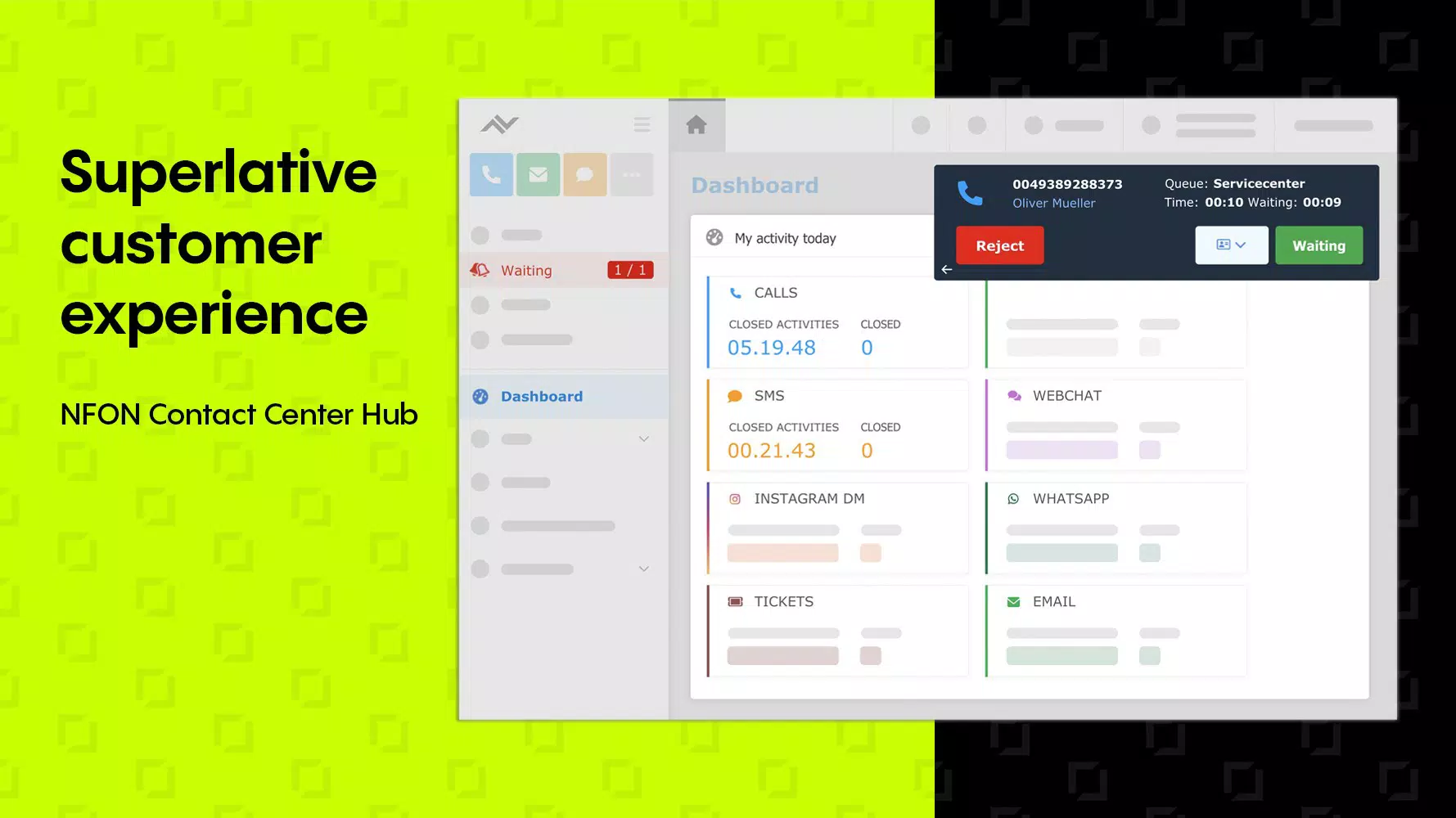
The NFON Contact Center Hub features a clean, task-oriented interface designed for rapid access to core functions. The layout emphasizes usability, with clearly labeled buttons and intuitive navigation. Agents can perform essential actions—such as answering calls, managing pauses, or switching queues—without navigating through multiple menus.
Visual design is functional rather than decorative, prioritizing clarity and real-time information display. Call status indicators, queue availability, and pause states are presented in a way that supports quick decision-making. Although the developer did not list formal performance metrics, the application appears optimized for consistent responsiveness across standard desktop environments.
Responsiveness is maintained during typical usage scenarios, including call transitions and queue changes. Stability is supported by its integration with the NFON platform, which likely ensures reliable background operations. While specific device compatibility details were not disclosed, the app is designed to operate efficiently on modern Windows systems commonly used in contact center settings.
Platform Compatibility & Technical Requirements
The NFON Contact Center Hub is available exclusively for the Windows platform. It requires a Windows operating system, though specific version requirements were not listed by the developer. The application has a file size of 113.6 MB, indicating a lightweight footprint suitable for deployment across multiple agent workstations.
Although the developer did not specify minimum OS requirements or hardware specifications, the app is designed for use in professional call center environments. The absence of detailed technical disclosures does not detract from its functionality, as it operates within a controlled ecosystem tied to NFON’s communication services.
For users seeking to install or update the application, the process is expected to be straightforward, given its integration with the NFON platform. No additional dependencies or third-party tools were mentioned, suggesting a self-contained installation experience.
Pros and Cons
Pros
- Free to use with an existing NFON license, reducing operational costs.
- Intuitive interface designed for fast agent onboarding and daily use.
- Core call center functions are centralized and accessible without switching applications.
- Supports real-time workflow management and team coordination.
- Seamless integration with NFON’s telephony infrastructure.
Cons
- Platform availability is limited to Windows; no support for macOS or Linux was confirmed.
- Specific system requirements were not disclosed, which may affect deployment planning.
- Feature set is focused on agent operations; advanced analytics or reporting tools are not included.
- Availability is restricted to users with an active NFON license, limiting broader accessibility.
- No information was provided on update frequency or future feature roadmap.
FAQ
Is NFON Contact Center Hub available for free?
Yes, the app is available at no extra cost to users with an active NFON license.
Can I install NFON Contact Center Hub on a Mac or Linux system?
The developer has not confirmed support for macOS or Linux. The application is currently available only for Windows.
What are the system requirements for running the app?
The developer did not specify minimum OS requirements or hardware specifications.
How does the call pick-up indication work?
The feature alerts agents when a call is routed to them, helping ensure timely responses and reducing missed interactions.
Is the app compatible with other telephony systems?
The application is designed to integrate with NFON’s communication platform. Compatibility with third-party systems was not confirmed.
Final Thoughts
The NFON Contact Center Hub delivers a focused, efficient solution for call center agents operating within the NFON ecosystem. Its core functionalities—manual dialing, call management, pause control, and queue handling—are thoughtfully implemented to support real-time responsiveness and workflow discipline. While platform limitations and lack of detailed technical disclosures exist, the app’s value lies in its seamless integration and cost-free access for licensed users.
Businesses seeking to enhance agent productivity, improve call handling, and maintain consistent service levels will find this tool particularly beneficial. It stands out as a reliable desktop utility for teams prioritizing workflow efficiency and team coordination in customer service operations.
Download NFON Contact Center Hub now


